Equipment
What you need before installing Go2Kin. This page has some comments, tips, things learned along the way, and notes on our own experience, so may be worth a quick read even if you know/have the equipment.
Note: long USB cables (20-30m) are not able to power the cameras on their own, the batteries are still needed, and they will slowly discharge while the cameras are on. Some choices and comments below reflect this. It's possible a powered USB hub solves this issue (we haven't tested this). In our lab we find USB + battery is simple to use so we stuck with that.
Cameras, batteries, SD cards
-
Cameras and batteries: up to 4 GoPro cameras + one battery per camera. We use Hero 12 Black; any model supporting the Open GoPro HTTP API (Hero 9 or later) should work.
-
Battery charger: we use 2 sets of 4 batteries, and 2 GoPro battery chargers. This way we can have 4 cameras running + 4 batteries charging, and swap batteries every few hours. You can purchase a charger with 2 batteries bundle from GoPro for approx. 90 AUD.
-
SD cards: each camera needs a MicroSD card. Pay attention to the SD card rating (see here for the rundown on SD card ratings), lower rated ones won't be able to keep pace with recording at high resolutions / high FPS. We are using SanDisk UHS Mark I (U1) and record at 4K 50FPS / 1080p 100FPS so this rating should be enough. Capacity doesn't matter much since each recording gets deleted off the SD card straight after downloading.
USB cables
-
One data-capable USB 3.0 (or better i.e. 3.1, 3.2) cable per camera.
-
You want cables with a good rating since we are using long cables. In our lab setup, we use 2x 20m and 2x 30m cables. We are using these from a local Australian supplier (optical cables), expensive but we've had no issues controlling cameras and downloading videos over the 30m cable, straight from a PC USB port with no hub.
PC
- Windows 11 (tested on Windows 11 Enterprise). Should work on other OSs e.g. Windows 10, just untested.
- NVIDIA GPU. Pose estimation will run on CPU, but far too slowly to be usable in practice. You do not need a high-end GPU. We are using a RTX 4060, which is the lowest end of that generation, and are perfectly fine running 4x pose estimation models in parallel. Even the large models (e.g. RTMPose-X) are <2GB RAM.
- Plenty of disk space on a fast drive. Multi-camera video adds up quickly. See Create the data folder.
Calibration board
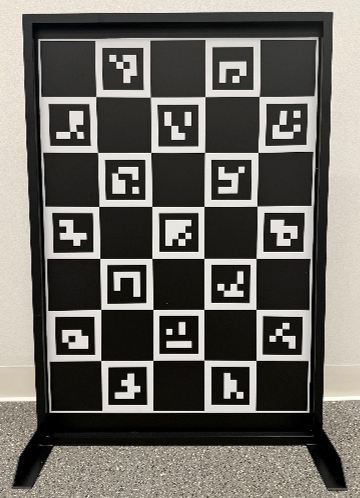
A printed charuco board, generated from the Calibration tab (default size A1) and mounted on a rigid, flat surface.
An A1-sized board (~800x600mm) works well for us with cameras in a ~9m square.
-
For best results, the system uses a double-sided Charuco board which allows cameras opposite each other to calibrate off each other (thanks Mac Prible / Caliscope for the great idea!). As a result, you want to make sure the two faces are indexed precisely (corners match on each side), and that the board is as thin as possible while maintaining rigidity (this is why we used aluminium; steel is stiffer but far too heavy at this size). Note that the two faces are mirrored images of each other! Be mindful of that during printing / assembly.
-
To get a good quality, rigid calibration board: find someone with a UV flatbed printer, to print the board directly on an aluminium sheet (or print on vinyl and stick it carefully). We used our local sign printing company, and they were so good with accommodating our unusual request! They printed us the A1 board on a 0.8mm aluminium sheet and built a frame / stand for rigidity. We paid ~600 AUD for it, and this was probably the best investment in the whole setup.
-
The other option is to sandwich the board between two sheets or clear acrylic, but you'll get refraction issues if the acrylic is too thick, and won't get good rigidity if it's too thin. In the end we think the UV print on thin metal sheet + tube frame for rigidity is the best solution.
-
Measure the actual printed square size after you have your board, and use the measured value in the board config. Printers don't always scale exactly.
Sync LED (optional)
Only needed if you use LED light sync instead of hand claps:
- A white LED that all cameras can see, driven at constant current (no PWM dimming) so it is clearly brighter than its background.
- An external trigger that switches it on for 1 second within the first 6 seconds of each recording.
See LED light sync for placement.
Other
- GoPros have small sensors and do not deal with low light particularly well. They will auto adjust ISO to compensate. Make sure your lab space has good lighting. Use extra spotlights if needed.